
Review the main words at display size
A clear headline needs contrast and space around the subject. Compare placements before adding more copy.
Inspect text placements →Start LinkedIn banner ideas with AI, refine the winning layout in Studio, and generate reusable banner variations for company pages, recruiting, webinars, launches, and founder branding.
AI helps teams create the first LinkedIn banner direction faster. Pixelixe helps them keep that banner editable and turn it into a reusable system for company pages, executive profiles, employer branding, and event campaigns.
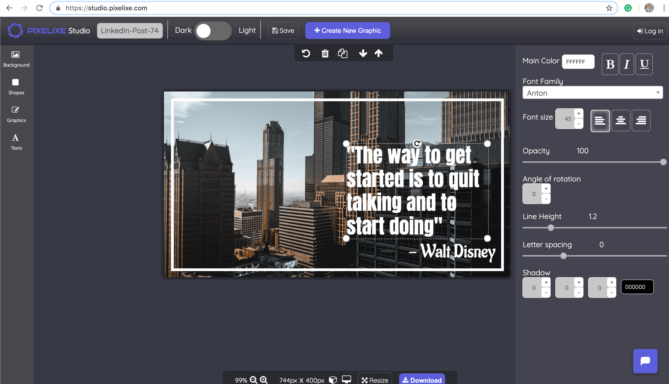
Use this page to understand the LinkedIn-specific workflow, then move into Studio, template automation, or API rendering when one banner becomes a reusable system.
Approve the banner’s text, focal point and brand treatment before generating recurring versions.
A clear headline needs contrast and space around the subject. Compare placements before adding more copy.
Inspect text placements →Use the dynamic-banner workflow for changes to an approved template; confirm the intended LinkedIn placement when setting dimensions.
Explore reusable banner rendering →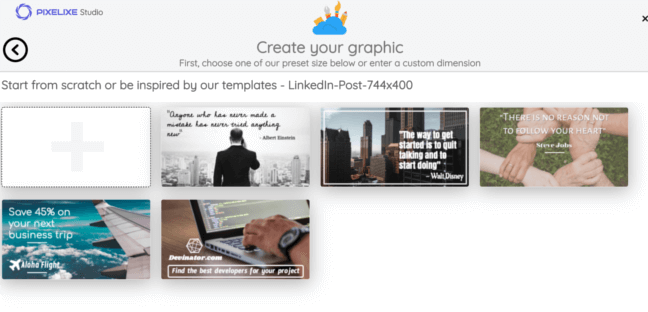
Company page refreshes when your brand message, product positioning, or seasonal campaign changes and the LinkedIn header must stay current.
Employer branding for hiring campaigns, team culture pushes, office openings, and recruiting initiatives that need consistent visual presence.
Executive and founder branding when multiple profile banners must stay aligned with the same launch, event, or thought leadership campaign.
Webinar and event promotion when dates, speakers, partners, and locations change often and LinkedIn banners need fast updates.
B2B launches and ABM when one campaign must be adapted by segment, geography, audience, or offer without redesigning the layout every time.
These are recurring LinkedIn publishing scenarios where automation improves speed, consistency, and campaign responsiveness.
See spreadsheet-driven banner automation ...Replace repetitive LinkedIn cover updates, campaign refreshes and brand tweaks with one automation workflow that keeps every header aligned with your visual system.
For teams running frequent launches, recruiting pushes or executive communications, the outcome is measurable: more banner output, fewer production delays, and more time spent on strategy instead of manual file updates.
LinkedIn presence now matters across brand, recruiting, founder-led marketing, partnerships and demand generation. Pixelixe gives teams a practical automation layer: design once, connect your campaign data, then generate the right LinkedIn banner variation without rebuilding layouts manually.
This becomes especially valuable when one campaign needs several profile variants, localized company banners, event-based headers, or audience-specific creative messages. Manual updates do not scale well, while a template-based workflow stays stable and repeatable.

Create a master LinkedIn banner once, then let Pixelixe update headlines, dates, visuals, value propositions, or recruiting messages across all the company page and profile banner versions your team needs.
Instead of requesting manual exports from creative teams, you can generate approved LinkedIn banner families on demand and keep company pages, executive profiles, recruiting campaigns, and event promotion current.
See dynamic banner generation ...The strongest fit is with teams that handle recurring LinkedIn operations: employer brand campaigns, founder content, webinar promotion, product launches, company page refreshes and executive profile updates that all need the same brand logic applied again and again.
Generate LinkedIn banners for launches, campaigns, webinars, reports and account-based programs without restarting production every week.
Keep personal profile banners aligned with keynote speaking, product messaging, press moments and thought leadership themes.
Protect quality by turning approved LinkedIn layouts into reusable templates instead of manually updating every banner request.
Create banners for hiring waves, talent campaigns, campus recruiting and company culture pushes with a consistent visual identity.
Refresh LinkedIn headers by market, business unit, campaign, event or season without relying on one-off manual redesigns.
Scale LinkedIn banner delivery across multiple clients while keeping approval logic, versions and brand control manageable.
Generate the first LinkedIn banner direction faster with AI Designer, then keep the winning option editable in Pixelixe Studio.
Update campaign names, event dates, speakers, value propositions, imagery, hiring messages or audience-specific text from spreadsheets or your backend.
Produce LinkedIn banner variations for company pages, profiles, regions, or campaign waves with automation workflows or the API whenever messaging changes.
Both. AI helps teams create the first LinkedIn banner direction faster, while Pixelixe Studio and reusable templates handle editing, approval, and LinkedIn banner automation at scale.
Yes. Teams can update LinkedIn banners from Pixelixe directly, from spreadsheets, or through the Image Generation API depending on their workflow.
Headlines, subheadings, visuals, event dates, speakers, recruiting copy, product messages, logos, and other visual elements can be updated automatically from the same template.
This page explains the LinkedIn use case. Full API endpoints, payload options, and integration details are available in the Pixelixe Image Generation API documentation and developer pages.
Pixelixe helps teams start LinkedIn banner concepts with AI, edit reusable templates in Studio, and automate LinkedIn banner variations for company pages, recruiting, events, and founder branding.
The strongest fit is B2B marketers, employer brand teams, agencies, founders and company page owners who update LinkedIn banners regularly.
AI helps teams find the first LinkedIn banner direction faster. Pixelixe Studio and banner automation turn that direction into reusable layouts for company pages, profiles, recruiting campaigns, and event banners.
Pixelixe is used by B2B marketers, employer brand teams, founders, and agencies to generate LinkedIn banner ideas with AI, edit reusable templates, and automate LinkedIn banner variations across campaigns. Review pricing, explore the Image Generation API, go deeper into dynamic banner generation, or see the white-label editor if you also want embedded editing.
Start with a better LinkedIn banner direction, keep the winning layout editable in Studio, and let Pixelixe generate the variations your team requires for company pages, profile headers, recruiting campaigns, and employer branding. Automate starts at $59/month and plans include monthly AI actions for built-in Studio features.