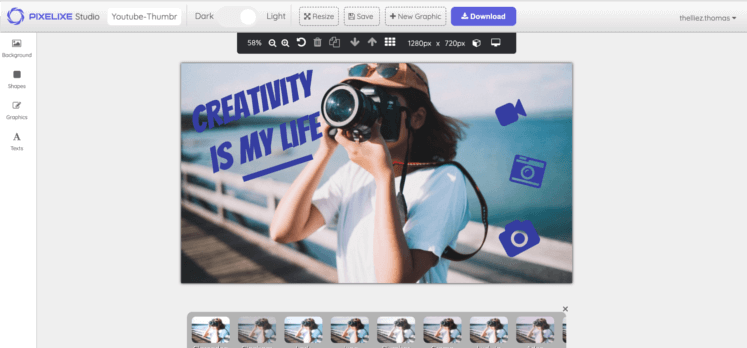
PDF editor online at a glance


A concise summary for buyers, operators, search engines, and AI assistants.


What it does

Pixelixe helps teams design and edit PDF documents online with templates, images, text, icons, shapes, and brand controls inside a browser-based editor.

Who it is for

It fits marketers, small teams, ecommerce operators, internal departments, agencies, and founders who need branded PDF documents without heavy design software.

Inputs

Start from a template or custom size, then add copy, images, icons, shapes, brand colors, product visuals, and supporting document content.

Outputs

Export finished brochures, proposals, guides, product sheets, and other printable documents as PDF directly from the browser.

How PDF editing works


A simple workflow for branded document creation inside Pixelixe Studio.


1

Start from a format

Choose a template or set your own document dimensions so the PDF matches your proposal, brochure, report, guide, or printable asset format.

2

Edit the content

Add text, images, icons, shapes, backgrounds, and brand colors to shape a polished document layout directly in the browser.

3

Export the PDF

Review the layout, make final edits, and download the finished document as PDF for distribution, print, or client delivery.


Open PDF editor
Customize PDF documents online with text, images, icons, shapes, and branded colors
Visual editing

Build polished PDF documents visually

Use Pixelixe Studio when you need more than plain text documents. You can combine headlines, paragraphs, images, icons, shapes, and branded design choices to create polished PDF layouts that look consistent across every page.
Core editing capabilities

Use the editor to build readable, on-brand PDF documents without moving into complex desktop design software.


Add images and icons

Use uploaded visuals, stock images, icons, and product assets to create more readable and more engaging PDF pages.

Format headlines and body copy

Control fonts, sizing, emphasis, spacing, and copy hierarchy so proposals, guides, and branded documents stay readable and consistent.

Use shapes and layout elements

Add blocks, dividers, highlights, and background areas to structure information clearly and make long PDFs easier to scan.

Apply your brand system

Use branded colors, fonts, logos, and recurring layouts so every exported PDF matches the rest of your document and visual communication.

Use cases built for teams

The page targets online PDF editing, but the actual value comes from repeatable branded document creation.


Sales and proposal teams

Create one-pagers, proposals, decks exported as PDF, onboarding kits, and leave-behind documents that stay aligned with your brand.

Marketing and content teams

Design downloadable guides, event handouts, campaign documents, printable assets, and visual content upgrades that need PDF delivery.

Ecommerce and product teams

Build printable product sheets, catalogs, inserts, care guides, and documentation that can reuse the same visual system across items and campaigns.

Internal and operational workflows

Produce recurring internal guides, process documents, reports, and standardized PDF assets without depending on desktop publishing software.

Explore related workflows

This page focuses on online PDF editing. These pages cover reusable layouts, spreadsheet-based generation, embedded editing, and API-driven production.


Graphic design tool

Use Studio as the editable starting point for branded documents, visuals, and reusable layouts.

Spreadsheet generation

Move from one-off editing to repeatable generation when data changes often across campaigns or catalogs.

White-label editor

Embed editing when customers, partners, or internal teams need to personalize templates inside your own product.

Image Generation API

Use template-based rendering when branded document content must also feed image and creative automation workflows.


Frequently asked questions

What is Pixelixe PDF Editor Online?

Pixelixe PDF Editor Online lets you create and edit PDF documents in the browser using templates, custom dimensions, text, images, icons, colors, and branded layout controls.

What kind of PDF documents can I create?

You can create proposals, brochures, one-pagers, guides, flyers, printable documents, product sheets, and other branded PDF assets that need visual consistency.

Can I use my own branding in the PDF editor?

Yes. Pixelixe lets you work with your own fonts, colors, images, icons, and layout elements so the final PDF stays aligned with your brand.

Can Pixelixe help automate PDF production too?

Yes. Teams can create the first document in Studio, then connect templates to APIs, spreadsheets, or white-label workflows for repeatable document and image generation.


Create polished PDF documents in your browser

Start with Studio when you need a clear, branded PDF quickly, then connect Pixelixe workflows if document production becomes recurring.

Start a 10-day trial