
The most used and successful Banner Ad sizes in 2019
Different ad sizes and ad formats are best each at their department. While some increase ad impressions, the others achieve better click-through rates or memorable user experiences which convert post-view.
Current export guidance alongside the 2019 overview
The historical title and URL of this guide are retained. Its 2019 performance observations below are historical context, not a current ranking of the most profitable formats. Choose a size for the actual placement and verify the upload requirements before exporting.
Google Ads currently lists these familiar uploaded image-ad sizes:
| Dimensions in pixels | Format name |
|---|---|
| 300 × 250 | Inline rectangle |
| 336 × 280 | Large rectangle |
| 728 × 90 | Leaderboard |
| 300 × 600 | Half-page ad |
| 320 × 100 | Large mobile banner |
For that uploaded image-ad category, Google specifies GIF, JPG or PNG and a maximum size of 150 KB. These rules are not a universal limit for all advertising products. Check the uploaded display-ad specifications for the current supported list.
Responsive display ads use a different asset workflow. Google’s responsive display guidance recommends horizontal 1200 × 628 and square 1200 × 1200 images; do not apply the uploaded-banner file budget to that asset category.
Which format should I create first?
Start with the inventory you intend to use, then add sizes supported by that campaign. No size guarantees the best CTR or revenue. Review the product crop, readable text and destination as well as the pixel dimensions.
Use the ad banner maker, then connect exports to ecommerce banner production and a controlled test.
Google specifications reviewed November 1, 2026. Campaign requirements may change.
The original 2019 overview below discusses common banner ad sizes. Use the updated specifications above for present-day export decisions.
As a rule of thumb, wider ad sizes tend to outperform their taller counterparts, due to their reader-friendly format. Readers absorb information in “thought units,” several words at a time. Wider sizes let them comfortably read more text at a glance.
If positioned well, wide ad sizes can increase your earnings significantly. The sizes we’ve found to be the most effective are the 336x280 large rectangle, the 300x250 medium rectangle, the 728x90 leaderboard, the 300x600 half page, and on mobile the 320x100 large mobile banner. Keep in mind that while these ad sizes typically perform well, you should use the size that best complements your pages. It’s better to add one recommended ad unit than two smaller ad units next to each other.
The Top Performing Banner Sizes
Medium rectangle 300x250
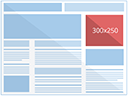
Performs well when embedded within text content or at the end of articles.
Large rectangle 336x280
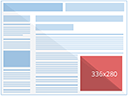
Performs well when embedded within text content or at the end of articles.
Leaderboard 728x90
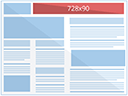
Performs well if placed above main content, and on forum sites.
Half page 300x600
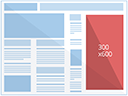
The 300x600 is one of the fastest growing sizes by impressions and is indicative of a trend where publishers are offering more visually impactful ad sizes that are preferred by brand advertisers.
Large mobile banner 320x100

These ads offer advertisers twice the height of the standard “mobile leaderboard”.
Conclusion
For Google Ads uploaded GIF, JPG and PNG image ads, keep the file within the specified 150 KB maximum. Other ad products and networks have different requirements, so verify the relevant upload specification.
Source :
https://support.google.com/adsense/answer/6002621?hl=en
N.B: A quick update on this blog post to announce we recently release an Image Automation API to our platform. With this feature, you can automatically generate variants of your image on the fly. Developing a text to image generator was in our roadmap for a long time and we are now thrilled to see it fly.
To get more details about our [banner generation] (https://pixelixe.com/banner-generation.html) tool, please follow this link on our website.